

Why Surface a Graded Rating
Ship a Rating, Not a Model
Render Webacy’s graded A+ to F composite instead of building and maintaining your own scoring model
Always Current
Poll on a cadence and the grade reflects live governance, liquidity, and code risk, not a one-time score
Explainable
A per-category breakdown shows users exactly what is driving the grade
- Graded output: an
A+-Fcomposite grade, a star rating, and a 0-100 score in one response - Category breakdown: per-category scores so you can show what is driving the grade
- Same shape for vaults and RWAs: one integration renders both
/v3/vaultsand/v3/rwa - Fail-closed: a freshness timestamp so you can hide stale grades instead of showing them
Prerequisites
Before implementing a rating, ensure you have:- A Webacy API key (sign up here)
- Basic familiarity with REST APIs or the Webacy SDK
- A vault or RWA contract address and its chain, plus the UI surface you want to render into
Step 1: Call the v3 Endpoint
Both/v3/vaults/{address} and /v3/rwa/{address} return the same graded shape. Call /v3/vaults for an ERC-4626 vault, and /v3/rwa for a tokenized real-world asset or a stablecoin (the RWA endpoint covers both). chain is required.
Step 2: Pull the Fields That Matter
Read the response into a small view model. These are the fields worth rendering:Step 3: Render the Badge
The badge is the small pill your users see next to the asset: the letter grade tinted by risk (green for theA band through red for F), with the numeric score in the tooltip. This component takes the view model from Step 2 and renders that pill, showing a neutral “Rating unavailable” state when the rating could not be loaded.
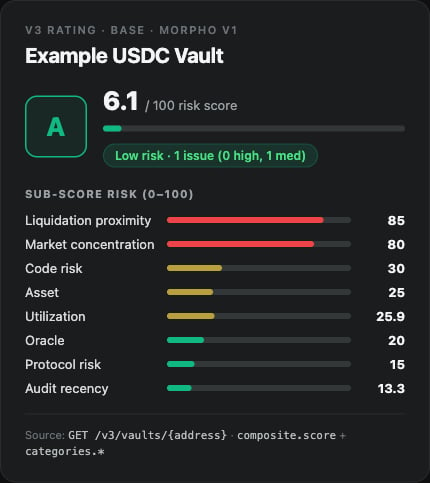
Example vault rating (sample data)
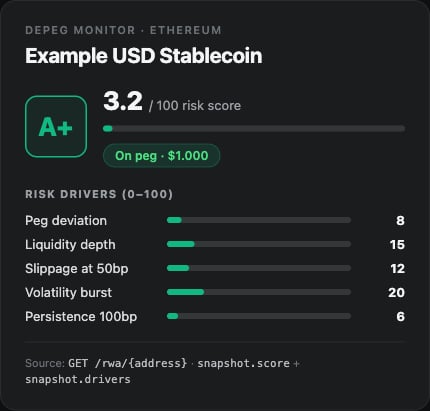
The same pattern for a stablecoin, sourced from the depeg endpoint (sample data)
Step 4: Show What’s Driving the Grade
Usecategories.* for an expandable breakdown, sorted worst-first (higher score = more risk):
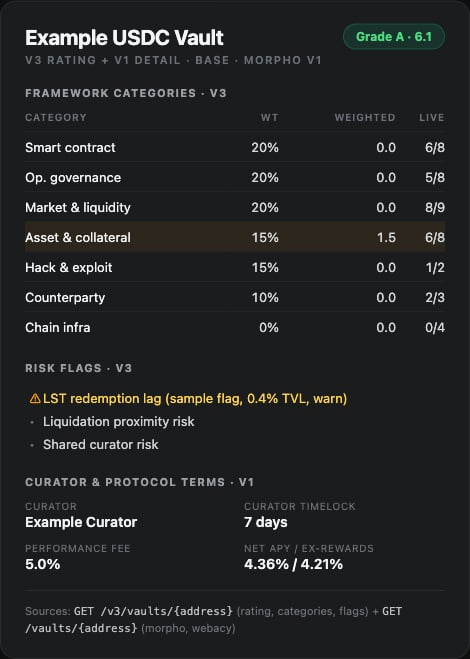
Example detailed rating breakdown, v3 rating plus v1 vault detail (sample data)
Handle Freshness and Failures
A rating you can’t vouch for is worse than no rating. The v3 detail endpoints do not return a top-levelstale flag, use metadata.last_scored_at to decide whether the grade is current enough to show.
Complete Example
Full React Implementation
Full React Implementation
API Quick Reference
Authentication:
Next Steps
Ongoing Risk Monitoring
Poll the rating on a cadence and alert when the grade or tier changes
New Asset Due Diligence
Run the full pre-allocation workflow before you surface an asset
Vault Risk (V3) API
Full endpoint reference for the graded vault rating
RWA Risk (V3) API
Full endpoint reference for the graded RWA rating