> ## Documentation Index
> Fetch the complete documentation index at: https://docs.webacy.com/llms.txt
> Use this file to discover all available pages before exploring further.
# Implement a Risk Rating in Your UI
> Surface Webacy's A+ to F vault and RWA rating in your UI: call the v3 endpoint, pull grade and category breakdown, and render a badge in React or HTML.
Your users see a vault or tokenized asset in your app. They have no way to tell a well-run vault from a risky one, and building your own scoring model is a project you don't want to own. This guide shows you how to surface Webacy's graded A+ to F rating instead: call one v3 endpoint, pull a handful of fields, and render a badge your users can trust.
## Why Surface a Graded Rating
Render Webacy's graded A+ to F composite instead of building and maintaining your own scoring model
Poll on a cadence and the grade reflects live governance, liquidity, and code risk, not a one-time score
A per-category breakdown shows users exactly what is driving the grade
**Why teams choose Webacy for ratings:**
* **Graded output**: an `A+`-`F` composite grade, a star rating, and a 0-100 score in one response
* **Category breakdown**: per-category scores so you can show what is driving the grade
* **Same shape for vaults and RWAs**: one integration renders both `/v3/vaults` and `/v3/rwa`
* **Fail-closed**: a freshness timestamp so you can hide stale grades instead of showing them
***
## Prerequisites
Before implementing a rating, ensure you have:
* A Webacy API key ([sign up here](https://developers.webacy.co/billing))
* Basic familiarity with REST APIs or the [Webacy SDK](/sdk/installation)
* A vault or RWA contract address and its chain, plus the UI surface you want to render into
***
## Step 1: Call the v3 Endpoint
Both `/v3/vaults/{address}` and `/v3/rwa/{address}` return the same graded shape. Call `/v3/vaults` for an ERC-4626 vault, and `/v3/rwa` for a tokenized real-world asset or a stablecoin (the RWA endpoint covers both). `chain` is required.
```bash cURL theme={null}
curl -X GET "https://api.webacy.com/v3/vaults/0x0deFfd509197aAD5207d2A55862835b467E8128F?chain=eth" \
-H "x-api-key: YOUR_API_KEY"
```
```typescript TypeScript theme={null}
const response = await fetch(
'https://api.webacy.com/v3/vaults/0x0deFfd509197aAD5207d2A55862835b467E8128F?chain=eth',
{ headers: { 'x-api-key': process.env.WEBACY_API_KEY } }
);
const rating = await response.json();
console.log(`Grade: ${rating.composite.grade} (${rating.composite.stars} stars)`);
console.log(`Score: ${rating.composite.score}/100, higher is worse`);
```
```python Python theme={null}
import requests
response = requests.get(
"https://api.webacy.com/v3/vaults/0x0deFfd509197aAD5207d2A55862835b467E8128F",
params={"chain": "eth"},
headers={"x-api-key": "YOUR_API_KEY"}
)
rating = response.json()
```
`composite.score` and every `categories.*.score` run 0-100 where **higher means more risk**: `A+` maps to a score near 0, `F` maps to a score near 100. This is the opposite of a health or safety score. When you color, sort, or threshold by this number, higher must render as *worse*.
To rate an RWA or a stablecoin instead, swap the path segment. Everything else is identical:
```bash theme={null}
curl -X GET "https://api.webacy.com/v3/rwa/{rwaAddress}?chain=eth" \
-H "x-api-key: YOUR_API_KEY"
```
***
## Step 2: Pull the Fields That Matter
Read the response into a small view model. These are the fields worth rendering:
| Field | What it drives in the UI |
| ---------------------------------------------------- | ------------------------------------------------------------------ |
| `composite.grade` | The headline letter badge (`A+` … `F`) |
| `composite.stars` | A 1 to 5 rating derived from the grade (optional secondary signal) |
| `composite.score` | Tooltip / numeric label (0-100, **higher = more risk**) |
| `categories.*.score` | The "what's driving the grade" breakdown, one row per category |
| `coverage.live_criteria` / `coverage.total_criteria` | A "based on X of Y checks" disclosure |
| `metadata.last_scored_at` | An "updated {time}" label and your freshness / stale handling |
```typescript theme={null}
type RatingViewModel =
| { ok: false; reason: string }
| {
ok: true;
grade: string;
stars: number;
score: number; // 0-100, higher = MORE risk
color: string;
categories: { name: string; score: number }[];
coverage: string;
updatedAt: string;
};
// Map on the first letter so every band (A+, A, A-, … F) resolves without gaps.
function gradeColor(grade: string): string {
switch (grade[0]) {
case 'A': return '#0d9c4a';
case 'B': return '#8bc34a';
case 'C': return '#ffc107';
case 'D': return '#ff9800';
default: return '#b71c1c'; // F
}
}
async function getRatingViewModel(
kind: 'vaults' | 'rwa',
address: string,
chain: string,
): Promise {
const res = await fetch(
`https://api.webacy.com/v3/${kind}/${address}?chain=${chain}`,
{ headers: { 'x-api-key': process.env.WEBACY_API_KEY! } },
);
// Fail closed: never render an errored or missing rating as if it were good.
if (!res.ok) return { ok: false, reason: `rating unavailable (${res.status})` };
const { composite, categories, coverage, metadata } = await res.json();
return {
ok: true,
grade: composite.grade,
stars: composite.stars,
score: composite.score,
color: gradeColor(composite.grade),
categories: Object.entries(categories).map(([name, c]: [string, any]) => ({
name,
score: c.score,
})),
coverage: `${coverage.live_criteria}/${coverage.total_criteria} checks live`,
updatedAt: metadata.last_scored_at,
};
}
```
***
## Step 3: Render the Badge
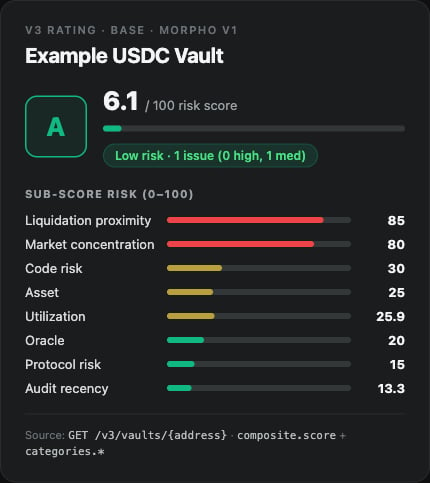
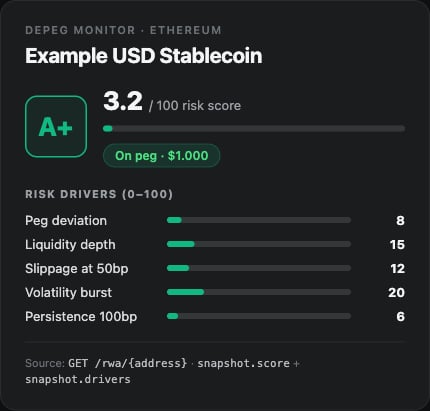
The badge is the small pill your users see next to the asset: the letter grade tinted by risk (green for the `A` band through red for `F`), with the numeric score in the tooltip. This component takes the view model from Step 2 and renders that pill, showing a neutral "Rating unavailable" state when the rating could not be loaded.
```tsx theme={null}
function RatingBadge({ vm }: { vm: RatingViewModel }) {
if (!vm.ok) {
return Rating unavailable;
}
return (
{vm.grade}
);
}
```
Plain-HTML equivalent, if you're not on React:
```html theme={null}
A
```
Rendered in a dark UI, the badge and its sub-scores look like this:
 ***
## Step 4: Show What's Driving the Grade
Use `categories.*` for an expandable breakdown, sorted worst-first (higher score = more risk):
```tsx theme={null}
function CategoryBreakdown({ categories }: { categories: { name: string; score: number }[] }) {
const sorted = [...categories].sort((a, b) => b.score - a.score); // worst first
return (
***
## Step 4: Show What's Driving the Grade
Use `categories.*` for an expandable breakdown, sorted worst-first (higher score = more risk):
```tsx theme={null}
function CategoryBreakdown({ categories }: { categories: { name: string; score: number }[] }) {
const sorted = [...categories].sort((a, b) => b.score - a.score); // worst first
return (
{sorted.map((c) => (
-
{c.name}
{c.score}/100
))}
);
}
```
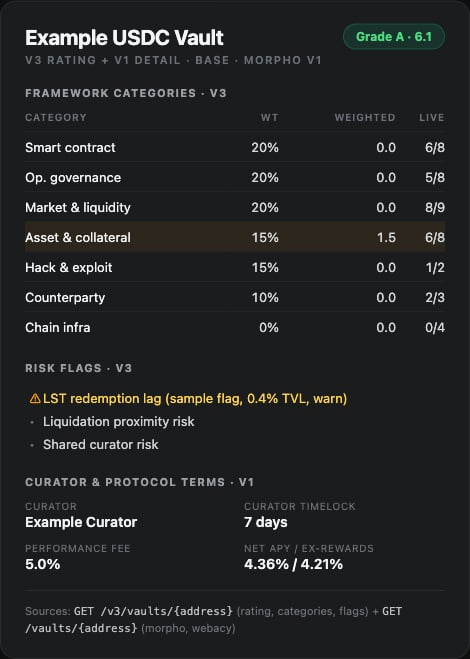
For a fuller view, the same rating powers a detailed breakdown: framework categories, risk flags, and curator terms.
 ***
## Handle Freshness and Failures
A rating you can't vouch for is worse than no rating. The v3 detail endpoints do **not** return a top-level `stale` flag, use `metadata.last_scored_at` to decide whether the grade is current enough to show.
Render an explicit "rating unavailable" state, not a stale grade, whenever the call fails or `metadata.last_scored_at` is older than your freshness policy. Treat missing or stale data as unknown risk, never as a pass. See [hard-gating and fail behavior](/api-reference/introduction#hard-gating-and-fail-behavior).
```mermaid theme={null}
flowchart TD
A[Fetch /v3/vaults or /v3/rwa] --> B{Response OK?}
B -->|No| U[Show 'Rating unavailable']
B -->|Yes| C{last_scored_at fresh?}
C -->|No| U
C -->|Yes| D[Build view model]
D --> E[Render badge: grade + color]
D --> F[Render category breakdown, worst-first]
```
***
## Complete Example
```tsx theme={null}
import { useEffect, useState } from 'react';
// See Step 2 for RatingViewModel, gradeColor, and getRatingViewModel.
function VaultRating({ address, chain }: { address: string; chain: string }) {
const [vm, setVm] = useState(null);
useEffect(() => {
getRatingViewModel('vaults', address, chain).then(setVm);
}, [address, chain]);
if (!vm) return …;
if (!vm.ok) return Rating unavailable;
return (
***
## Handle Freshness and Failures
A rating you can't vouch for is worse than no rating. The v3 detail endpoints do **not** return a top-level `stale` flag, use `metadata.last_scored_at` to decide whether the grade is current enough to show.
Render an explicit "rating unavailable" state, not a stale grade, whenever the call fails or `metadata.last_scored_at` is older than your freshness policy. Treat missing or stale data as unknown risk, never as a pass. See [hard-gating and fail behavior](/api-reference/introduction#hard-gating-and-fail-behavior).
```mermaid theme={null}
flowchart TD
A[Fetch /v3/vaults or /v3/rwa] --> B{Response OK?}
B -->|No| U[Show 'Rating unavailable']
B -->|Yes| C{last_scored_at fresh?}
C -->|No| U
C -->|Yes| D[Build view model]
D --> E[Render badge: grade + color]
D --> F[Render category breakdown, worst-first]
```
***
## Complete Example
```tsx theme={null}
import { useEffect, useState } from 'react';
// See Step 2 for RatingViewModel, gradeColor, and getRatingViewModel.
function VaultRating({ address, chain }: { address: string; chain: string }) {
const [vm, setVm] = useState(null);
useEffect(() => {
getRatingViewModel('vaults', address, chain).then(setVm);
}, [address, chain]);
if (!vm) return …;
if (!vm.ok) return Rating unavailable;
return (
{vm.grade}
{vm.coverage} · updated {vm.updatedAt}
{[...vm.categories].sort((a, b) => b.score - a.score).map((c) => (
-
{c.name}
{c.score}/100
))}
);
}
```
***
## API Quick Reference
| Endpoint | Use Case |
| ---------------------------------------- | --------------------------------------------------------------- |
| `GET /v3/vaults/{address}?chain={chain}` | Graded vault rating (grade, stars, score, categories, coverage) |
| `GET /v3/rwa/{address}?chain={chain}` | Graded RWA rating (same shape as vaults) |
**Authentication:**
```text theme={null}
Header: x-api-key: YOUR_API_KEY
Base URL: https://api.webacy.com
```
***
## Next Steps
Poll the rating on a cadence and alert when the grade or tier changes
Run the full pre-allocation workflow before you surface an asset
Full endpoint reference for the graded vault rating
Full endpoint reference for the graded RWA rating